


- Home
- Features and tools
Platform overview · 70+ features
Every inspection tool, in one platform
Manage inspections, assets, workflows and reports in one structured system. As a result, you reduce admin, increase visibility and make better decisions.
- Mobile-first inspections
- AI assisted reporting
- Works offline
Speak and AI fills the form
Shared with your client
Jump to a category
Field inspections
Inspect anywhere, even offline
Built for the reality of the field: low signal, gloves on and no time to waste. As a result, every inspection is captured once, correctly, on site.
Camera-first execution
Run any checklist on phone, tablet or web with auto-save, live scoring and conditional questions.
Works fully offline
Inspect without signal. Then photos, voice notes and changes sync automatically once you are back online.
Photo capture & annotation
Draw circles, shapes and text on photos. In addition, every image keeps its time and GPS stamp.
GPS & location
One-tap GPS and a map picker on location fields, so every inspection is tied to a place.
Mark all OK or N/A
Clear whole sections in one tap with a reason, then run a pre-submit check before you finish.
On-site e-signatures
Collect inspector and client signatures on the device, with reminders for multi-party sign-off.
Tablet layouts
A three-pane view on landscape tablets keeps the form, photos and asset history side by side.
Walk & Snap
Capture photos hands-free zone by zone, then link each one to a finding.
Safe delete
Deleted inspections stay in Recently Deleted for 30 days. Also, signed inspections are protected.
AI features
AI that does the admin
AI handles the typing and the paperwork, so inspectors can focus on what they see. In addition, every AI result is labelled and checked by a person before it ships.
Voice Assist
Speak while you inspect. AI then fills the right fields and suggests findings, even in Estonian.
AI report narrative
Get an executive summary, overall condition and recommendations written for you to review and approve.
Photo Intelligence
AI marks issues on your photos and proposes findings, so you can accept or dismiss each one.
Standard Check
Set visual criteria once. Then AI checks each photo as met, not met or can’t see.
AI Assistant
Ask your data in plain language and get answers with sources, limited to what you are allowed to see.
AI Template Studio
Turn a prompt, photo, PDF or spreadsheet of a paper checklist into a ready template.
Inspector guidance
See prior findings, anomaly warnings and quality gates in real time while you inspect.
Walk & Talk (early access)
Skip the checklist. Instead, walk the site, talk and snap photos while the inspection builds itself.
Translation & your own AI keys
Translate content on demand. Also, plug in your own AI provider keys if your policy requires it.
AI output is always labelled as AI-generated and must be verified by the inspector before a report can be signed.
Templates & checklists
900+ templates. Any checklist in minutes.
Choose from over 900 ready-made inspection templates, or build your own with drag and drop. Then adapt any checklist to the way you work.
Drag-and-drop builder
19 field types, from pass/fail and ratings to photos, signatures, sliders and traffic lights.
Logic, scoring & validation
Conditional questions, weighted scoring and validation rules, so every inspection stays consistent.
900+ ready-made templates
Start from over 900 ready-made inspection templates, including 150 construction checklists, in English, Russian and Estonian.
Template marketplace
Share templates between accounts with versioning and update tracking.
Import & clone
Move templates in and out as JSON, or clone them into another workspace in one click.
Quick Check
A free self-inspection anyone can run from a public template, then download the report.
Reviews & approvals
The right process, every time
Every inspection follows the right review path. As a result, every change is on record and easy to trace.
Four submission flows
Simple, internal review, client review or full cycle, configured per inspection.
Multi-stage approvals
Approval stages with conditions on score or severity, as well as deadlines and escalation.
Revision diff
See exactly what changed between versions, field by field, or compare two inspections side by side.
Findings management
Track severity, urgency, cost estimate, due date and owner from open to done.
Account audit log
A filterable record of who changed what, so admins always have the full picture.
Verified before signing
Inspections filled by AI cannot be signed until every field has been verified.
Reports & sharing
Professional reports, ready on site
Reports are generated the moment an inspection is signed. Then share them as a branded PDF or a secure live link.
Branded PDF reports
Your logo, colours and fonts on every report, with photos and signatures included.
Secure share links
Share a live report link with view tracking, a photo toggle and an expiry date.
Scheduled delivery
Email reports automatically to clients, users or roles on a schedule.
Flexible report content
Choose what to show, such as the summary, analysis, recommendations, photos and findings.
Deposit Packs
Compare move-in and move-out photos, then produce a signed deposit report to share.
Care reports
Summarise everything that happened to an asset over a chosen period.
Tasks & teamwork
Turn findings into finished work
Create tasks straight from findings and keep the whole team moving, from the office to the field.
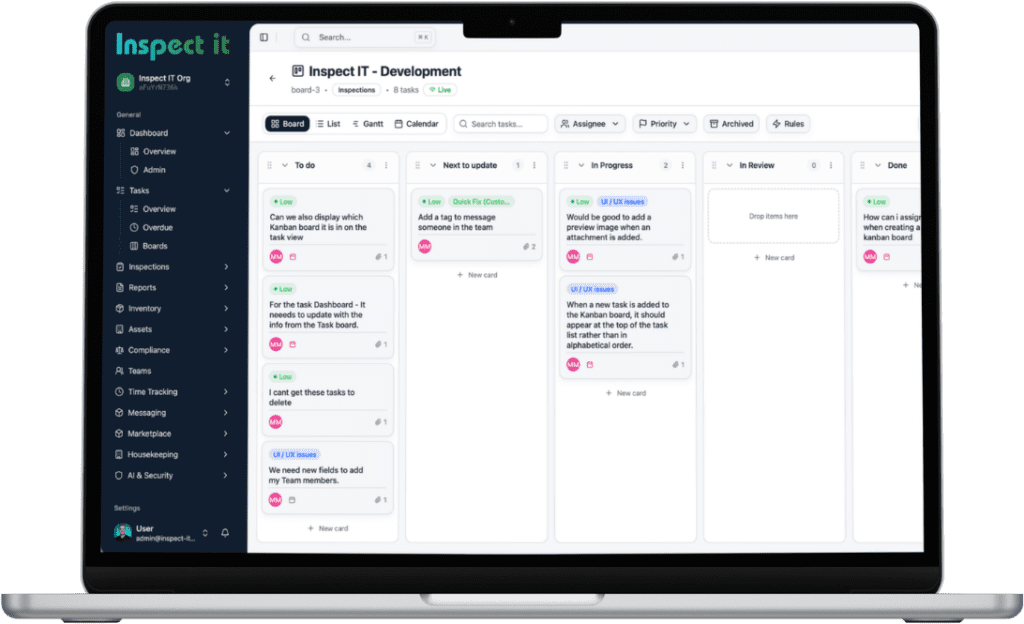
Kanban boards
Drag-and-drop boards with swimlanes, checklists, attachments and live updates.
Calendar & Gantt
Switch any board to a calendar or a Gantt timeline, then drag to reschedule.
Smart Assignment
Get suggestions for who should take a task, based on workload, availability and history.
Automation rules & SLAs
WHEN / IF / THEN rules, business-hour SLA clocks and escalation chains.
Time tracking
Timers, billable hours and daily summaries, as well as a lock-screen timer on Android.
Shifts & rostering
Plan shifts and assign people, so timers end automatically at the end of each shift.
Team chat
Rooms, direct messages, attachments and reactions, with offline sending on mobile.
Staff performance
Average score, time and findings per inspector at a glance.
My Work Today
A focused daily work list for housekeeping teams and runners.
Assets & compliance
Know every asset, today and tomorrow
See the condition of every asset now, and where it is heading next. As a result, you can plan maintenance before problems grow.
Asset risk scoring
Risk scores for structural, mechanical, electrical, safety and compliance, with trend tracking.
Condition forecast
Condition history per zone, as well as a forecast of when it will reach yellow or red.
Photo diff over time
Spot what changed in the same zone since the last inspection.
Maintenance schedules
Service logs, due and warning status, readiness scores and an annual forecast.
Recurring schedules
Daily to yearly inspection, task or maintenance schedules with run history.
Certificate tracking
User and asset certificates with expiry alerts and reminder emails.
Compliance standards
Define standards, run checks against them and keep the full results history.
Meter readings
Record meter readings and service intervals for every asset.
Inventory & stock
Items, storage locations, batches, par levels and stock movements.
Analytics & insights
Turn inspection data into decisions
Spot patterns across sites, assets and teams. Then act on the issues that matter most.
Recurring issue detection
Find the problems that keep coming back across your sites and assets.
Benchmarking & trends
Compare sites and assets, and see how results change over time.
Heatmaps
See at a glance where findings cluster across your portfolio.
Configurable dashboard
Drag-and-drop widgets for tasks, inspections, compliance, expenses and team workload.
Portfolio overview
Period-on-period changes with an AI explanation that you can share.
Expenses & billing
Log expenses with receipt scanning, then turn hours and costs into client invoices.
Integrations
Connected to how you work
Connect Inspect it to your systems, and bring in the people who do not have an account.
REST API & webhooks
Connect your systems with the API, as well as webhooks with event filters and delivery logs.
QR codes & external links
Let tenants, guests or contractors report issues or self-inspect without an account, protected by a code.
Booking calendar feeds
Import iCal feeds from Airbnb, Vrbo, Booking.com and charter tools to trigger work automatically.
Email & SMS campaigns
Design branded emails, then send email or SMS campaigns on a schedule.
Push & in-app notifications
Instant alerts on Android, iOS and web, with an email follow-up if a task stays unread.
Live updates
Lists and dashboards refresh on web and mobile without reloading.
Security & control
Enterprise control, privacy built in
Decide who sees what, protect every account and stay in control of your data.
Roles & permissions
Owner, admin, member, viewer and client roles, plus custom roles enforced on the server.
Secure sign-in
Two-factor authentication, magic links, email codes and Google sign-in, with revocable sessions.
GDPR ready
Personal data export, erasure requests and full account deletion, as well as a public trust page.
Confidential documents
Per-user access grants, access logs and retention policies for sensitive files.
White-label branding
Apply your brand colour to reports and to the app interface.
Multi-language & multi-account
Use the app in English, Russian or Estonian, and switch between accounts in one tap.
Let's get connected
We’d love to hear from you!
Whether you’re a property owner, tenant, or investor, your goals drive our innovation. In addition, have questions, collaboration opportunities, or need intelligent solutions for your property? As a result, our team is ready to deliver.
Let’s Start the Conversation:
Quick Connect: Fill out our “Let’s Connect” form for direct access to property management specialists.
Email: support@inspectit.eu
We reply quickly and tailor our advice to your needs. For example, every inquiry is a chance to help.
Your success starts with a conversation—let’s build it together
You can unsubscribe from these communications at any time. For more information on how to unsubscribe, our privacy practices, and how we are committed to protecting and respecting your privacy, please review our Privacy Policy.